
Download Tubecaster – Music from YouTube, Audio-Only Downloads, WMV Conversion
Overview
Tubecaster is a mobile application designed to serve music lovers and multimedia enthusiasts who seek a streamlined way to access YouTube content without visual distractions. The app enables users to extract and download audio from YouTube videos, allowing them to enjoy their favorite tracks on the go while conserving storage space. It also supports full video downloads and conversion into WMV format, making it compatible with portable MP4 players. This functionality positions Tubecaster as a utility tool for offline content consumption, particularly beneficial for users who rely on portable devices for entertainment during commutes, workouts, or travel.
Target users include individuals who want to build a personal music library, students seeking offline access to educational videos, and casual viewers who prefer to listen to audio while multitasking. The app’s focus on audio-only extraction and format conversion suggests a niche yet practical purpose within the broader mobile app ecosystem. Although the developer did not provide additional background information, Tubecaster has been available since 2008, indicating a long-standing presence in the space. Its continued relevance suggests consistent functionality and user demand over time.
Real-world use cases include saving music for offline listening, archiving tutorial videos for later review, or transferring content to older devices that support WMV playback. The app fills a gap for users who want greater control over YouTube content without relying on third-party websites or complex software.
Key Features & Functionality
- Audio-Only Downloads: Tubecaster allows users to extract only the audio from YouTube videos, ideal for creating a personalized music library without visual clutter. This feature is particularly useful for background listening during physical activities or work.
- Full Video Downloads: Users can download entire YouTube videos in their original format, ensuring access to complete content for later viewing, especially in areas with limited internet connectivity.
- WMV Conversion: The app converts downloaded videos into WMV format, enhancing compatibility with a wide range of portable MP4 players and older media devices that may not support other formats.
- User-Friendly Interface: Designed with simplicity in mind, Tubecaster offers a straightforward layout that enables even novice users to navigate the app efficiently and perform downloads with minimal effort.
- Free to Use: All features are available at no cost, with no subscriptions or hidden fees. This makes Tubecaster an accessible option for users seeking a no-strings-attached solution for offline media consumption.
For example, a student might use Tubecaster to download a lecture video and convert it to WMV for playback on a handheld device during a long train ride. Similarly, a music enthusiast could extract audio from a live performance video and save it as a high-quality MP3 for their personal collection. These practical applications demonstrate the app’s value in everyday scenarios where offline access and format flexibility are essential.
Interface, UX & Performance
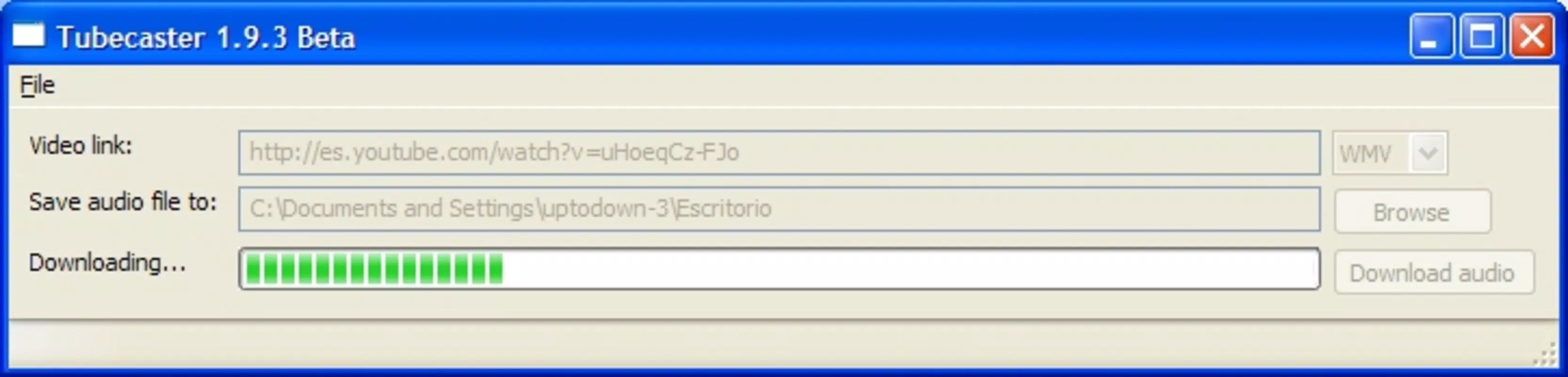
Tubecaster features a clean, minimalistic interface designed to prioritize functionality over visual complexity. The layout focuses on core actions—entering a YouTube URL, selecting download type, and initiating the process—ensuring a smooth user journey. Navigation is intuitive, with clearly labeled buttons and a logical flow that minimizes user confusion. The design emphasizes usability, making it accessible to individuals with limited technical experience.
Although the developer did not list formal performance metrics, the app’s long-standing availability suggests a stable and reliable operation across various device categories. Users can expect consistent responsiveness during the download and conversion processes, particularly on devices with sufficient processing power and storage. The app appears optimized for efficient use of system resources, minimizing battery drain and background activity during extended operations.
Stability is a notable aspect, especially given the app’s release date in 2008. Despite its age, Tubecaster continues to function without reported widespread crashes or errors. However, compatibility with modern mobile operating systems may depend on ongoing updates, which have not been detailed by the developer. Users should be aware that older apps may not support the latest OS versions without modifications.
Platform Compatibility & Technical Requirements
Tubecaster is available for Android and iOS platforms, though specific OS versions and minimum requirements were not listed. The app’s file size is not disclosed, but its functionality suggests it is lightweight enough to operate efficiently on mid-range devices. Given its release date in 2008, the app predates many current mobile standards, which may affect its ability to run seamlessly on newer systems without additional configuration.
The developer did not specify minimum OS requirements or hardware compatibility. Users should exercise caution when installing on recent devices, as older applications may encounter issues due to security restrictions, API changes, or deprecated permissions. Compatibility information was not fully disclosed, so installation on newer platforms may require third-party tools or sideloading.
Pros and Cons
Pros
- Free to use with no hidden costs or subscriptions.
- Supports audio-only downloads for efficient music listening.
- Enables full video downloads for offline access.
- Offers WMV conversion for broader device compatibility.
- Simple, intuitive interface suitable for beginners.
Cons
- Specific technical requirements were not listed.
- Compatibility with modern operating systems is uncertain.
- Developer did not provide update history or future support plans.
- May require sideloading or third-party tools for installation on newer devices.
- Performance on high-end devices has not been verified.
FAQ
Is Tubecaster safe to download and install?
While Tubecaster has been available since 2008, users should ensure they download the app from trusted sources to avoid potential security risks. As with any third-party application, caution is advised when installing on modern devices.
Can I use Tubecaster on iOS devices?
Yes, Tubecaster is available for iOS, though specific compatibility details with current iOS versions were not provided by the developer.
Does Tubecaster require an internet connection?
Yes, an active internet connection is required to access YouTube content and initiate downloads. However, once downloaded, videos and audio can be played offline.
Are there any restrictions on the size or length of videos I can download?
There are no publicly disclosed limitations on video size or duration. However, actual limits may depend on device storage and network conditions.
How do I update Tubecaster?
Update information was not provided. Users may need to manually check for new versions through the source where the app is hosted.
Final Thoughts + CTA
Tubecaster remains a noteworthy tool for users seeking a straightforward way to extract audio and convert YouTube videos for offline use. Its focus on audio-only downloads and WMV conversion fills a specific need in the mobile app landscape, particularly for those who value offline access and device compatibility. While its age raises questions about modern compatibility, the app’s enduring functionality and free access make it a compelling option for tech-savvy users willing to navigate potential installation hurdles.
Whether you're a music lover building a personal library or a student archiving educational content, Tubecaster offers practical benefits without cost. Its user-friendly design and versatile features ensure a smooth experience for a wide range of users. For those looking for a no-frills, free solution to enjoy YouTube content offline, Tubecaster stands out as a reliable choice.
Download Tubecaster now


